Color Wheel
Color wheel for complementary, analogous, triadic, split, square and monochrome colors: drag the hue and copy the matching hex codes. Free, in your browser.
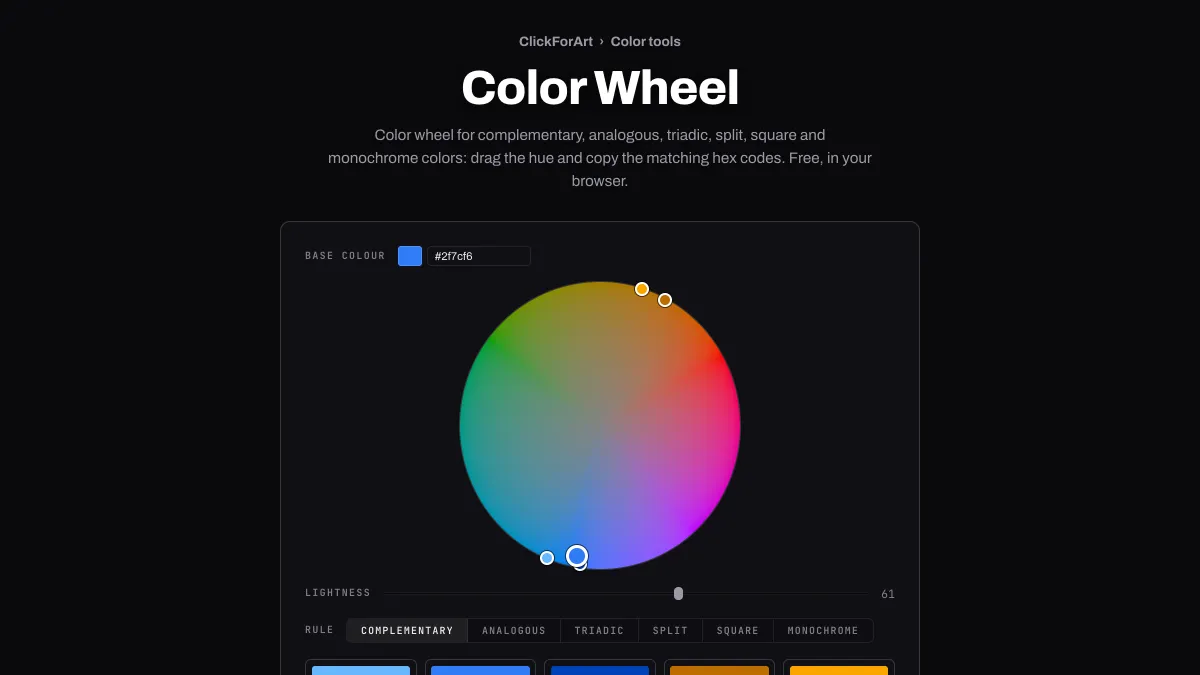
What is a color wheel?
A color wheel (or chromatic wheel) lays out the hues in a circle, so hues facing each other across it are complements and neighbors are related. Isaac Newton drew one in Opticks in 1704 by bending the spectrum around until the red and violet ends met. Closing that gap needed purples, which no single wavelength of light can produce.
Johannes Itten taught color at the Bauhaus using a twelve-hue circle, and complementary contrast was one of the seven kinds of contrast he identified.
How to find complementary colors on the color wheel
Drag anywhere on the wheel to move the handle. Its angle sets the hue, and its distance from the middle sets the saturation, from gray at the center out to the most vivid color at the rim. Lightness controls how light the whole wheel is, and Base colour takes a hex code if you already have a color in mind. With the keyboard, focus the handle: left and right turn the hue, up and down change saturation, and Shift makes the steps bigger.
Rule chooses the harmony: Complementary, Analogous, Triadic, Split, Square or Monochrome. Its five colors show up as dots on the wheel and as swatches with hex codes underneath. Click a swatch to copy it, or Copy all to get one comma-separated line.
Which colors does each rule pick?
Complementary adds the hue directly opposite, 180 degrees around, plus a lighter and darker step of your color and a lighter complement. Analogous picks the hues 20 and 40 degrees to either side. Triadic spaces three hues 120 degrees apart. Split takes the two hues next to the complement, at 150 and 210 degrees, and Square takes four hues 90 degrees apart. Monochrome keeps your hue and steps it lighter and darker.
You'll notice that dots sharing a hue but differing in lightness sit on the same spoke, often at different distances from the middle. That's because how vivid a hue can get depends on how light it is.
Is the complement of red green or cyan?
That depends on which wheel you use. The painter's red, yellow and blue wheel puts green across from red. An RGB wheel like HSL's puts cyan there, #00ffff, the color that adds to red light to make white. This wheel is drawn in OKLCH, the polar form of Björn Ottosson's Oklab, where the angle tracks hue the way people see it: red sits near 29 degrees, yellow near 110, green near 142 and blue near 264.
Type #ff0000 into Base colour and choose Rule Complementary, and the opposite swatch comes out #00a9db, a sky blue somewhere between the two textbook answers. The exact opposite angle is 209 degrees, but sRGB can't show red's chroma there, so the color gets clipped into range and its dot lands near 228. Blue's complement turns out a brick red, #a02000, and yellow's a pale lilac, #f4d8ff.
Paint really does behave the way the painter's wheel says, so use its pairs when you're mixing pigments. For screen colors, the pairs here start from your color's own lightness. A swatch and its complement end up looking about equally bright, unless clipping moves one of them.
Why can't the wheel show a vivid yellow and a vivid blue at once?
The wheel only shows one lightness at a time, and every hue is at its most vivid at a lightness of its own. On this wheel's rim, yellow peaks at Lightness 96, green at 86, red at 63 and blue at 45. At Lightness 50 the blue rim is an intense #043fff while the yellow is olive, #686800. At 90 it flips: yellow is #e8e800 and blue has faded to #cedeff.
The rim gets scaled hue by hue to the most chroma sRGB allows at that lightness, the same way saturation works in Ottosson's Okhsl, so its edge is always as vivid as a screen can manage there. For a vivid accent, set Lightness near the peak for its hue before dragging out to the rim. And expect a complementary pair at one lightness to be strong on one side and soft on the other.
Settings for a dark-mode accent, a pastel set and a dusty scheme
Dark-mode accent: type your light-mode color into Base colour, then raise Lightness and don't touch the handle. #2f7cf6 sits at Lightness 61. At 65 the wheel gives #4a8cf7, at 5.70:1 on #121212, and at 70 it gives #669ef8, at 6.97:1. It's the same blue, made light enough for a dark page. Double-check the pair in Color Contrast Checker.
Pastel set: Lightness 88, the handle halfway out to the rim, and Rule Triadic. Using the default blue's hue, that gives #ccd8eb along with a pale pink #ead0cf and a pale green #cedcca, all tints for backgrounds behind dark text. #1d3557 reads on #ccd8eb at 8.59:1.
Dusty scheme: drag the handle a third of the way out, set Lightness to 55 and pick Analogous. The hues stay put but they lose most of their chroma, which gives the faded look of an old print. From the default blue you get #58729d, with #477799 and #696d9c on either side.