Color Mixer
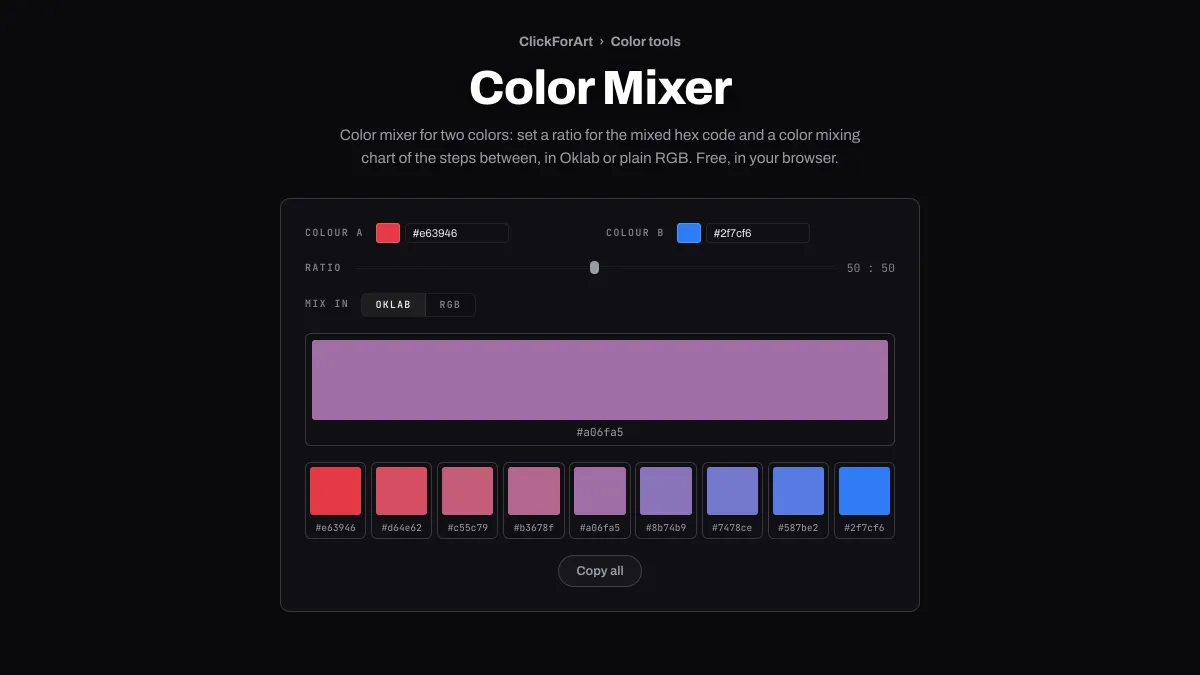
Color mixer for two colors: set a ratio for the mixed hex code and a color mixing chart of the steps between, in Oklab or plain RGB. Free, in your browser.
What does a color mixer do?
It blends two colors in whatever ratio you choose and gives you the result as a hex code. On a screen, mixing color is just arithmetic. Each color is a set of numbers, and the mix sits part of the way from one set to the other.
Paint works differently. Pigments absorb light, which is why blue and yellow paint make green, while on this page the same two colors meet at a gray in RGB or a muted light blue in Oklab. If you need to match paint, you'd want a pigment model like Kubelka-Munk, and this tool doesn't use one.
How to mix two colors
Set Colour A and Colour B with the pickers or by typing hex codes. Ratio slides from all A to all B. The numbers beside it read A : B, so 70 : 30 means mostly A. Mix in switches between Oklab and RGB.
The large swatch is the mixed color, and clicking it copies its hex code. Under it, the color mixing chart runs from A to B in nine steps, each an eighth apart. Every swatch copies its own code, and Copy all grabs all nine as one comma-separated line.
What is the difference between Oklab and RGB mixing?
RGB averages the stored red, green and blue values. Those values are gamma encoded, so mixing two saturated colors tends to give you something darker and duller than Oklab would. Blue and yellow, for instance, average out to plain gray, #808080.
Oklab, the color space Björn Ottosson published in 2020, is built so equal steps look like equal changes. A mix there converts both colors, moves the chosen share of the way along lightness and the two color axes, then converts back. The starting red #e63946 and blue #2f7cf6 meet at #a06fa5 in Oklab, and at a darker #8b5a9e in RGB. In CSS Color Module Level 5, the color-mix() function also mixes in Oklab if you don't name a space.
Mixes for a hover state, a tinted panel and a chart ramp
Hover and pressed states: make Colour A the button color and Colour B black, with Mix in on Oklab. Ratio 90 : 10 gives a hover state a step darker, and 85 : 15 gives a pressed state: #276bd6 and #2463c6 from #2f7cf6. For a dark button, mix toward white instead. Run each new pair through Color Contrast Checker along with its label color.
Tinted panel: with Colour B on white, 10 : 90 gives you a background with just a trace of the brand, #eaf3ff from #2f7cf6, and dark text such as #1d3557 reads on it at 11.04:1. In dark mode, mix toward #121212 at 15 : 85 to get a near-black with the same hint of blue, #18212f.
Chart ramp: put the two ends of your data scale in A and B, then take the first, third, fifth, seventh and ninth swatches from the chart for five even steps. Mixed in Oklab, those steps climb evenly in lightness, and that's what a sequential chart needs so people read it in order.
Why does my mix come out gray or muddy?
Colors from opposite sides of the wheel meet close to gray, because the straight line between them passes near the neutral middle. #2f7cf6 and its complement #be6d00 meet at #837f98 in Oklab, with a chroma of 0.038 against 0.198 and 0.141 at the two ends, and at an even flatter #77757b in RGB. Blue #0000ff and yellow #ffff00 sag to a muted #90c2b2 on the way across in Oklab, and to plain #808080 in RGB.
To keep a mix colorful, do it in two steps through a hue that sits between the two. Mix from blue to a green, #00a651, and then from that green to yellow, and the halfway points come out #007bb5 and #9cd345, at chroma 0.127 and 0.179. Compare that with the direct route, whose lowest step had just 0.057.
Why don't red and green make yellow here, as light does?
Light adds up. Shine a red lamp and a green lamp on the same wall and you get yellow, and on a screen full red plus full green is #ffff00. This mixer averages instead, which is like each light giving half its power, and in linear light that halfway color is #bcbc00. Mix in RGB averages the stored, gamma-encoded values and ends up on a darker olive, #808000, while Oklab gives a golden #d0a800.
The best way to read the Ratio is as a share of area, like a fine pattern of the two colors seen from across the room. Of the two modes, Oklab gets closer to that pattern's brightness. Its mix has an OKLCH lightness of 74.6 percent compared with the pattern's 77.0, while the olive from RGB sits at 58.1.